Online Payment

Paying in China: Alipay, WeChat Pay & TenPayGo

Alipay, WeChat Pay and TenPayGo let you pay merchants in mainland China with an overseas bank card. TenPayGo also supports Apple Pay and overseas e-wallets. A Chinese bank account is not required for these purchases.

TenPayGo checked October 4, 2026; Alipay and WeChat Pay guidance checked September 5, 2026.

Quick start: what to prepare before your trip

  • 01Alipay, WeChat Pay or TenPayGo
  • 02Access to your phone for Alipay or WeChat registration, or email for TenPayGo. Passport details if identity checks are requested.
  • 03An overseas bank card in your name, or Apple Pay / a supported e-wallet for TenPayGo.
  • 04Mobile data and some cash.

Choose and set up your payment app

All three offer merchant payments with overseas cards. Choose based on how you want to register and which other services you need.

Alipay

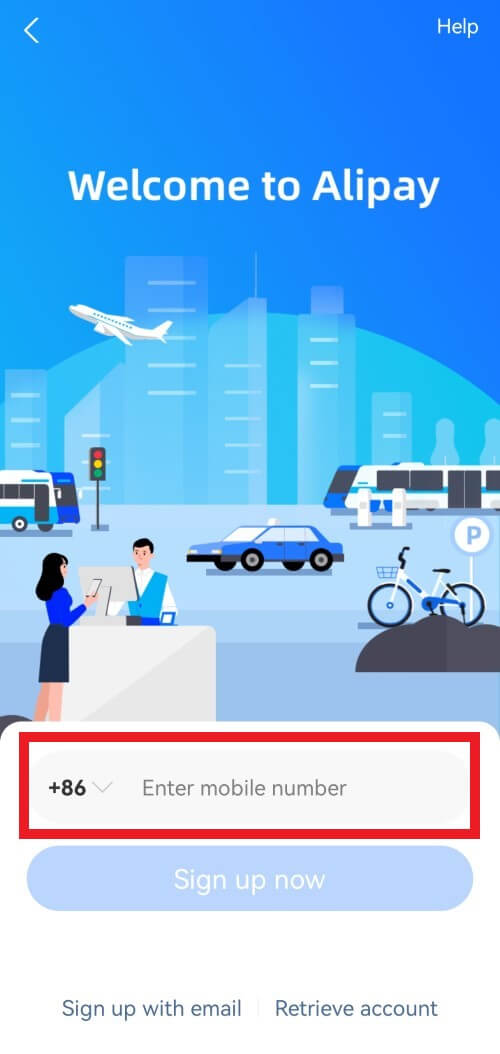
A payment app with local services such as ride-hailing. Register with your phone number; an overseas number works.


Download on the App StoreGet it on Google Play

Set up

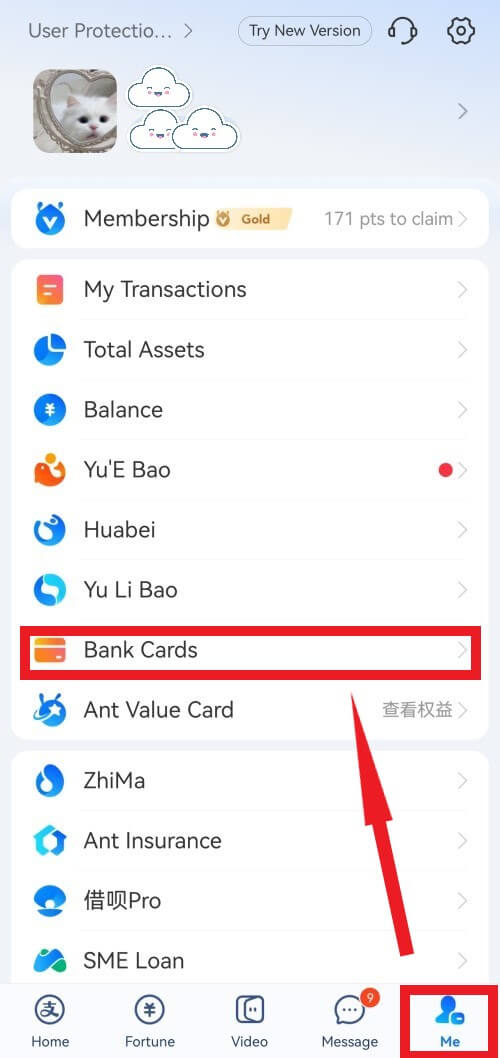
Register or sign in, then open Me → Bank Cards → Add Bank Card. Follow your bank’s verification prompts and complete passport checks when requested.

Card networks include: Visa, Mastercard, JCB, Diners Club, Discover and UnionPay International.
WeChat Pay

Payments within WeChat, alongside chat and mini programs for services such as restaurant ordering. Use your existing WeChat account or register with an overseas phone number.

Download on the App StoreGet it on Google Play

Set up

Open Me → Services → Wallet → Add a Card. Follow the card and identity-verification prompts, with your passport ready. Menu labels can vary by version.

Card networks include: Visa, Mastercard, JCB, Diners Club and Discover.

TenPayGo

Tencent’s standalone app for paying Weixin Pay merchants. No Chinese phone number or WeChat account is needed. You can use an international card, Apple Pay or a supported overseas e-wallet.

Download on the App StoreGet it on Google Play

Set up

Register with your email address and its verification code, then set your login pattern. Choose Bank Card, Apple Pay or E-Wallet and complete the checks requested. Apple Pay lets you use an eligible card without entering its details manually.

Card networks include: Visa, Mastercard, American Express, JCB, Diners Club, Discover and UnionPay issued outside mainland China.

Use a card or e-wallet in your own name. Card acceptance depends on the issuer as well as the app. TenPayGo may also request identity verification. Setup and card sources.

Alipay menu examples
Alipay registration screen with the country-code selector and mobile number field outlined in red.
Select your own country code; +86 is only the example.
Alipay Me tab with a red arrow pointing to Bank Cards and the Me tab outlined at the bottom.
Me → Bank Cards · Tap to enlarge

Screenshots: Hainan government’s Alipay guide (June 2025). Menu examples, not a list of features available to overseas-card accounts.

Paying by QR code

Two ways to pay. The difference is who scans whose code.

1

You scan the shop’s code

Open Scan, point your camera at the merchant’s QR code, then enter the amount if asked and confirm the payment.

2

The cashier scans your code

Open your live payment code in the app and hold your phone towards the cashier’s scanner. In TenPayGo, open Pay codeand confirm the payment on your phone after the cashier scans it.

Illustrations only. App screens and menu labels vary by version.

Use Pay, then check for payment success

Before paying: Pay and Receive are different. In Alipay and WeChat, Pay / 付款 is for paying a shop;Receive / 收款 is for receiving money. TenPayGo’s merchant code is labelled Pay code.

After paying: check the success message and amount. In TenPayGo, you can also find payments in Transactions.

A menu, order confirmation or payment QR code alone does not confirm payment. If you are unsure, ask the cashier to confirm they received your payment.

Can I transfer money to a person with a foreign card?

Not with the overseas card linked for shopping. Alipay’s international-card service excludes personal transfers; Shanghai’s WeChat Pay guidance also excludes transfers and red packets funded by overseas credit cards. TenPayGo also excludes personal transfers, receiving money and red packets. Sending money to a friend requires a separately supported transfer method or funding source.

Paying in shops and restaurants

Look at what the cashier or table is showing you. If you get stuck, show the staff the matching Chinese phrase below.

At a convenience store

Cashier ready with a scanner?

Have your app’s payment code ready for the cashier to scan.

请扫我的付款码。

Please scan my payment code.

At a restaurant table

The QR code opens a menu?

Follow the restaurant’s checkout instructions, then look for a payment-success confirmation. If the menu needs a WeChat mini program, open it in WeChat or ask staff for a merchant payment code to use with TenPayGo.

请问在哪里付款?

Where do I pay, please?

At a small shop

A printed payment code on the counter?

If your overseas card is unavailable, the code may be for a personal transfer rather than a merchant payment. Ask about another payment method.

可以用现金吗?

Can I pay in cash?

Still stuck? Find your payment problem or see our translation tips.

Fees and payment limits

Alipay and WeChat Pay

For purchases funded by a linked international card, the standard Alipay and WeChat Pay fee schedule in the Ministry of Commerce guide is:

Standard international-card payment fees
Purchase amountApp service fee
RMB 200 or lessNo service fee
Over RMB 2003% of the full purchase amount

For example, a RMB 300 purchase carries a RMB 9 service fee under this schedule. Your bank's foreign-transaction or currency-conversion charges are separate—even a card with no foreign-transaction fee does not remove the app's charge. The fee shown by the app applies to your particular payment. Official fee guidance

Payment limits: Shanghai's July 2026 guidance lists ceilings of US$5,000 per transaction and US$50,000 per year for linked international cards. Your account or bank may set a lower limit. Official payment limits

TenPayGo

International-card and Apple Pay payments may carry a service fee, shown before you confirm. Use TenPayGo’s own fee and limit screens: its published terms do not specify a fixed rate or numeric cap. The Alipay and WeChat Pay figures above are specific to those apps.

Overseas-wallet payments are excluded from TenPayGo’s international-card service fee; the wallet may charge its own fees. Payment limits also depend on verification and your bank or wallet. TenPayGo payment terms.

TenPayGo refunds

Ask the merchant to arrange a refund. It can return to the original card or e-wallet; TenPayGo’s terms also provide for returning the user handling fee charged for that payment. Check payment and refund details in Transactions. Arrival time depends on the merchant and payment providers.

If a payment fails

Card cannot be added or verification fails

Linking a card requires your issuer's approval as well as the app's checks. If the details are correct but verification is rejected, ask your bank whether it declined the authorization; app support handles identity-verification issues.

Your bank declines the purchase

Look for an authorization request or international-payment block in your bank app. Switching payment apps with the same declined card may leave the bank block unresolved.

Only this shop or QR fails

If your card works elsewhere, this may be a merchant or QR-code issue. Ask the cashier to scan your payment code if scanning theirs fails, or vice versa. If neither works, ask about another payment method.

TenPayGo support: [email protected] or +86 571 95017, daily 09:00–21:30 China time (UTC+8).

Cards and cash

Linking your card to a payment app does not mean a shop can accept that card directly at its terminal. Look for your card network's logo at the checkout.

Keep some cash. You can exchange it for RMB after arrival or withdraw RMB at an ATM displaying your card network. A second card from another bank is an optional backup.

Sources and verification notes
  • Official payment guide — Ministry of Commerce, 2025: overseas phone registration, card linking, QR payments and currency exchange.
  • Alipay card support and Shanghai's wallet setup guide — supported networks and examples of app menus.
  • Alipay terms — sections 2.1–2.2 and 4.6–4.7: identity checks, merchant purchases, transfer restrictions and account limits.
  • WeChat Pay terms — Appendix 3: overseas-card accounts, identity verification and restrictions on transfers and balance use.
  • Standard fee schedule — Ministry of Commerce, 2024: the RMB 200 threshold and 3% fee on the full amount above it.
  • Payment limits, cards and cash — Shanghai government guidance updated July 24, 2026, sourced from the People's Bank of China Shanghai Head Office.
  • TenPayGo official website and payment terms — payment methods, seven card networks, identity checks, merchant-only payments, fees, limits, refunds and customer support.
  • TenPayGo developer listing and screenshots — merchant QR payments and confirmation on your phone after the cashier scans your code.
  • Published TenPayGo setup guide — brand guide reproduced by Mobile Payment Network on September 24, 2026: email registration, login pattern, Transactions and merchant-initiated refunds. The original publisher’s post was not independently accessed.

TenPayGo sources checked October 4, 2026; Alipay and WeChat Pay sources checked September 5, 2026. No live TenPayGo transaction was tested. App menus and account-specific fees or limits may differ from the published guidance.

Related Guides

Continue your China travel check

Next checkWill your phone work when you arrive?Prepare mobile data and essential apps before you depend on them.Back to travel essentials

Last updated: October 4, 2026