China Internet: SIM Roaming, eSIM & Local Apps
International roaming can keep Google and WhatsApp working in China, often with the SIM already in your phone.
Which connection fits your trip?
| Your connection | A good fit when… |
|---|---|
| Home-carrier roaming | China is included in your plan, or a roaming pass covers your stay.Keep your usual number on the same line. |
| Travel data planSIM or eSIM | You want a separate data allowance for the trip.A data-only plan has no number for calls or texts. |
| Mainland SIM | You need local calls or a service that asks for a Chinese number.Get a +86 number; bring your passport to register. |
Google and WhatsApp in China
Your usual apps on mobile data — a different story on Wi-Fi.
Hotel Wi-Fi or a mainland SIM
Some overseas services are blocked
Including Google, Facebook and YouTube.
Overseas SIM or eSIM on China roaming
Google and WhatsApp can work
With a plan that routes data overseas.
WhatsApp works outside, then stops at the hotel? Your phone may have joined the Wi-Fi. Switching back to your roaming data can get you connected again.
Roaming is useful for more than keeping your own number. M1 in Singapore advertises Google and WhatsApp access in China without a VPN; Hong Kong's SmarTone lists those apps too. Many travel SIMs and eSIMs offer the same benefit through an overseas connection.
When choosing a plan, look for China coverage and access to the apps you use, then compare the data allowance and price for your stay. “Unlimited” can still mean slower speeds after a daily allowance. If you buy a separate SIM or eSIM, your phone must be unlocked; an eSIM also needs a compatible handset.
Using your own number in China
You can register Alipay with a foreign mobile number, and DiDi Greater China also supports foreign numbers and international credit cards. You do not need a +86 number just to pay or book a ride through these services.
With your home carrier's roaming plan, the same line can handle data and texts. If you buy a separate travel data plan, you can keep your usual number alongside it on a dual-SIM phone.
Two active lines
Maps, messaging & apps
Mobile data
Text verification codes
SMS
If you add a travel data plan
Keep your number for verification texts.
A data-only plan gets your apps online but cannot receive SMS. Codes sent to your usual number still arrive on your home line.
Your phone needs to support both lines at once, and your home line needs roaming service for texts. Its carrier's charges still apply.
A mainland SIM becomes useful if you need local calls or a particular service requires a Chinese number. Foreign visitors can apply at China Mobile, China Unicom or China Telecom service offices with a passport. The line must be registered in your name.
Maps, payments and rides
Find your way with Amap
Amap (高德地图, also called Gaode) helps you find your way around China in English, from a walk through the neighbourhood to a metro trip across town. Its main map services work without logging in.
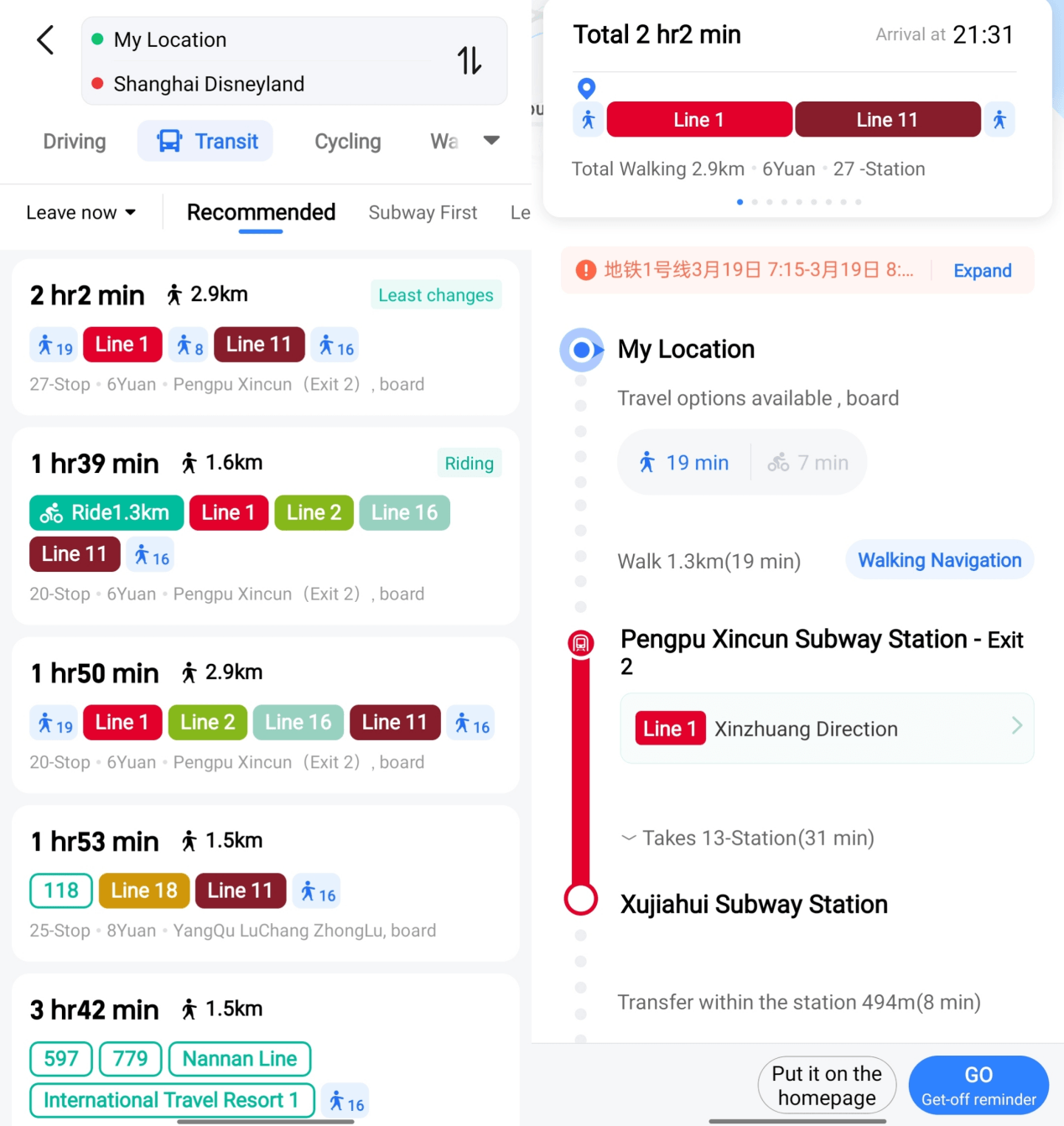
Beyond the metro line
Which exit? How far to walk?
This route shows the station exit and the walk between lines: eight minutes inside one interchange. Useful details when you're deciding how to get across the city.
The directions are in English, though some service notices still appear in Chinese.
Interface example from Shanghai's Amap guide, accessed September 17, 2026. Times and fares shown are illustrative. Select the image to enlarge.
Book a ride inside Alipay
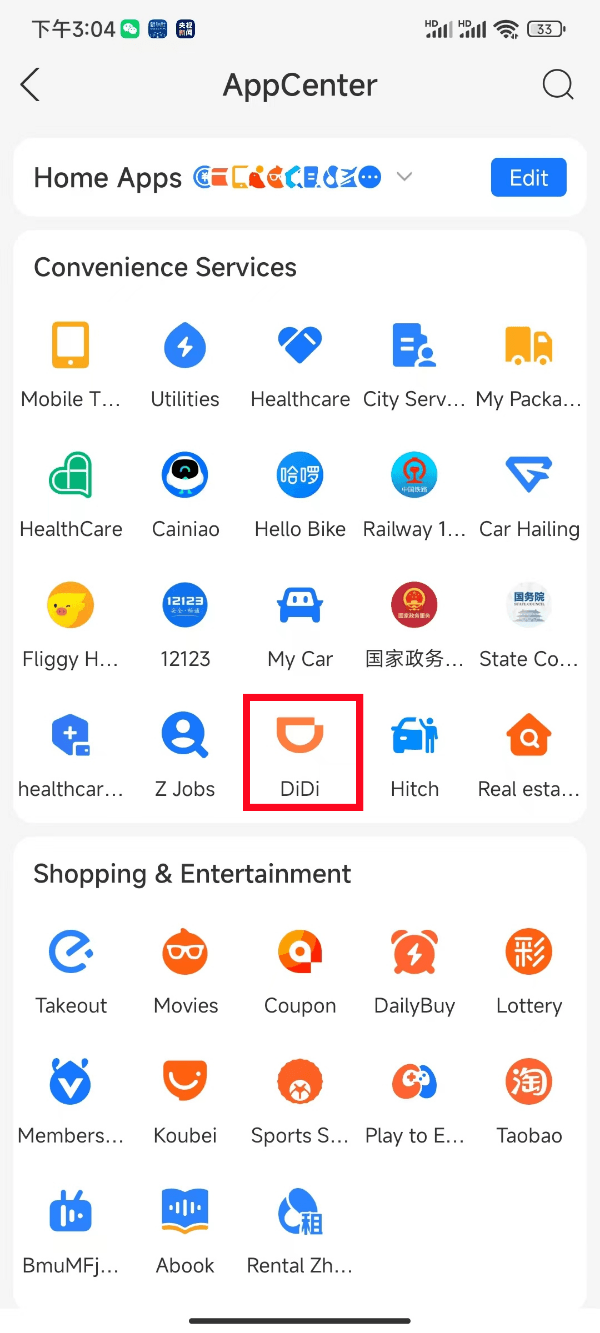
More than payments
Already using Alipay? DiDi is in there too.
DiDi runs as a mini app inside Alipay, so you can book a car without downloading another app. It offers an English interface when you use Alipay in English.
Look for the orange DiDi icon, highlighted here in Alipay's AppCenter, to open the ride service.
Interface example from Shanghai's Alipay guide, accessed September 17, 2026. Menu layouts may vary. Select the image to enlarge.
If you prefer a dedicated ride-hailing app, DiDi Greater China is another option, with support for foreign phone numbers and international credit cards.
For the China-specific payment details — including foreign cards and the different kinds of QR code — see our guide to paying in China.
Sources and verification
Roaming, dual-SIM and app-access information checked on September 17, 2026; other sources checked on September 6, 2026. Network-access claims come from provider documentation, not our own connection tests.
- M1: roaming in China — Google and WhatsApp access without a separate VPN on its Daily Passport service.
- SmarTone: mainland China and Macau roaming — access to WhatsApp, Facebook, Instagram and Google.
- Airalo: China eSIM features — overseas routing, data-only plans and fair-use limits.
- Apple: using Dual SIM with an eSIM — separate voice and data lines on supported iPhones, carrier unlocking and charges.
- UK travel advice: internet access — services blocked on mainland networks.
- Guide to Working and Living in China (PDF) — SIM registration and Alipay on PDF page 10; ride-hailing and foreign numbers on page 13.
- China Mobile: real-name registration (Chinese).
- International Services Shanghai: Amap's multilingual services — English navigation and access without login; information supplied by Amap.